
LifecycleIQ: HubSpot Lifecycle Reporting That Shows What's On Track
HubSpot reporting tells you what happened. But what about what should be happening?
The gap between historical reports and real-time funnel health is where company goals slip through. You hit the end of the quarter, pull your numbers, and realize you've been behind for weeks—you just didn't see it until now. And when lifecycle stages live in one report and deals live in another, connecting lead performance to pipeline and revenue takes even more manual work.
That's why I built LifecycleIQ—a simpler approach to HubSpot lifecycle reporting that shows you what's on track and what's not, from first touch to closed revenue, without the manual work.
The Problem with HubSpot Lifecycle Reporting Today
If you've ever tried to get a clear picture of funnel health in HubSpot, you know the drill:
You're stitching together multiple reports. One for MQLs, one for SQLs, one for opportunities—and then a separate set for deals and pipeline. Each report lives in its own tab. None of them talk to each other. You end up in a spreadsheet trying to connect the dots yourself.
You can't mix date fields in the same report. Want to see MQLs created this month and pipeline created this month in the same executive summary? HubSpot won't let you filter by different date fields in one report. You'd need a BI tool and custom formulas to pull that off. So instead, you're copying numbers into slides manually.
Lifecycle stages and deal stages don't connect easily. You can see how leads are progressing, or you can see how deals are progressing—but seeing the full picture from first touch to closed revenue requires manual work or a BI tool.
There's no easy way to compare performance against goals. You know your targets. But seeing how you're tracking against them—by stage, in real time—requires manual math or a tool you may not have time to set up.
By the time you spot a problem, it's already downstream. A dip in MQLs three weeks ago is now a pipeline gap. You're not catching issues early because your reports weren't designed for that.
What LifecycleIQ Does
LifecycleIQ gives you visibility across your entire revenue engine—lifecycle stages and deal stages—so you can see where you're on track and where you're not, without jumping between reports.
See both funnels in one place. View your lifecycle funnel and your deal funnel side by side. If you sync Salesforce opportunities with HubSpot, those show up too.
Build a custom funnel that connects them. Create a unified view that spans from first touch through closed revenue. Define the stages that match how your business actually works—not just HubSpot's defaults.
See every stage for the same time period—in one view. MQLs this month, SQLs this month, pipeline this month—all in one table, filtered the same way. No more stitching together reports with different date fields. You'll know immediately whether you're on track to hit your goals this month or this quarter.
Track pipeline and revenue, not just lead volume. See how funnel performance translates to pipeline and revenue. Know whether a slowdown in MQLs is already affecting downstream numbers.
Set goals and track against them. Add targets for each stage and see at a glance whether you're ahead, behind, or right on pace.
Spot trends with cohort views. See how contacts and deals move through your funnel over time. Identify patterns, catch slowdowns early, and start predicting future outcomes based on current performance. (Cohort analysis is powerful—but it also means waiting months to see results. That's why LifecycleIQ gives you both: cohort trends and real-time goal tracking.)
How It Works
Setup is simple. Connect your HubSpot account, and LifecycleIQ pulls in your lifecycle stages and deal stages automatically. If you have Salesforce synced, your opportunities come through too. Define your custom funnel, set your goals, and you're ready. No complex configuration, no code.
Once you're in, you'll see your full funnel on one screen—from lead stages through pipeline and revenue. Each stage shows current volume, goal progress, and trend direction.
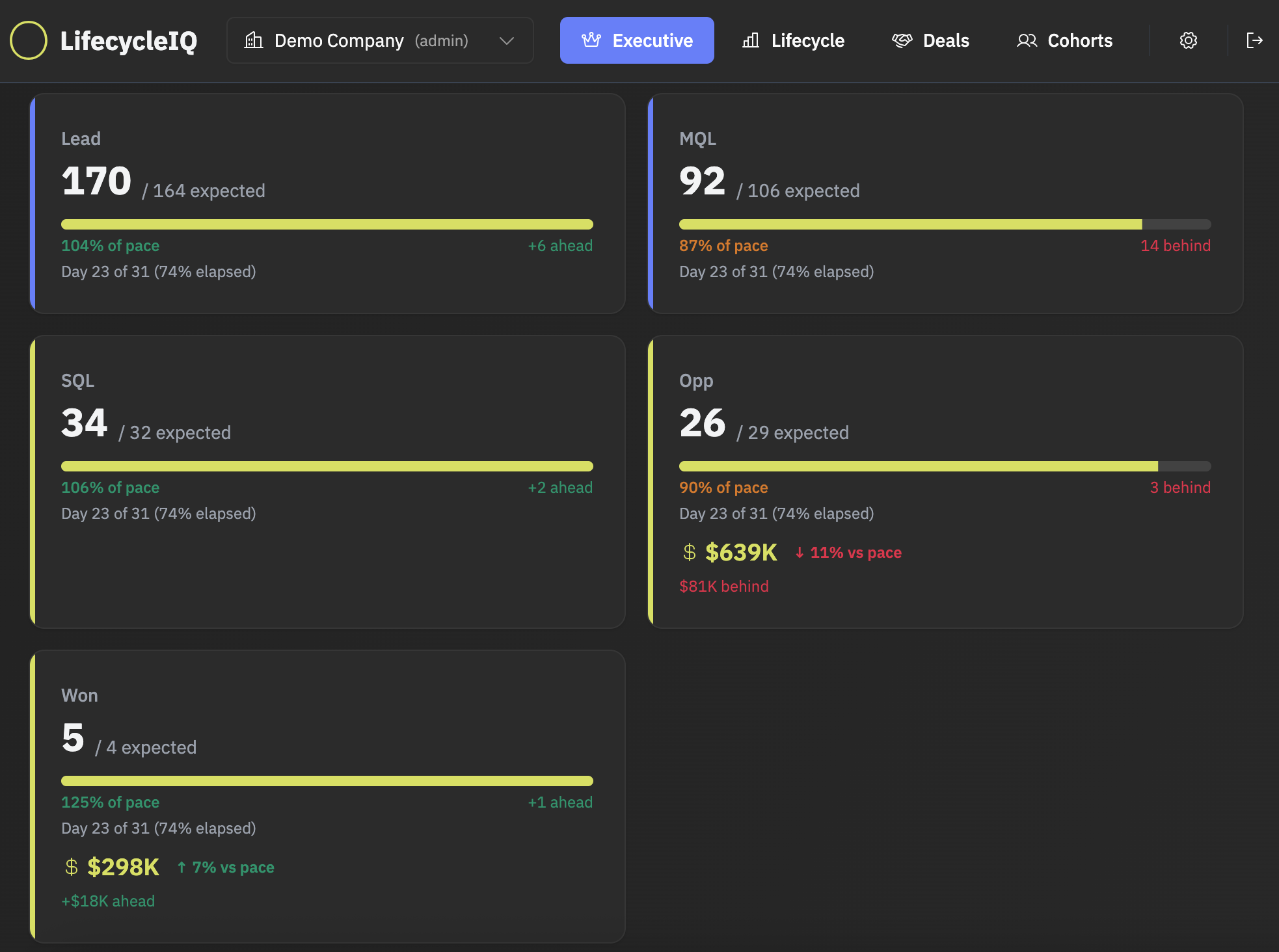
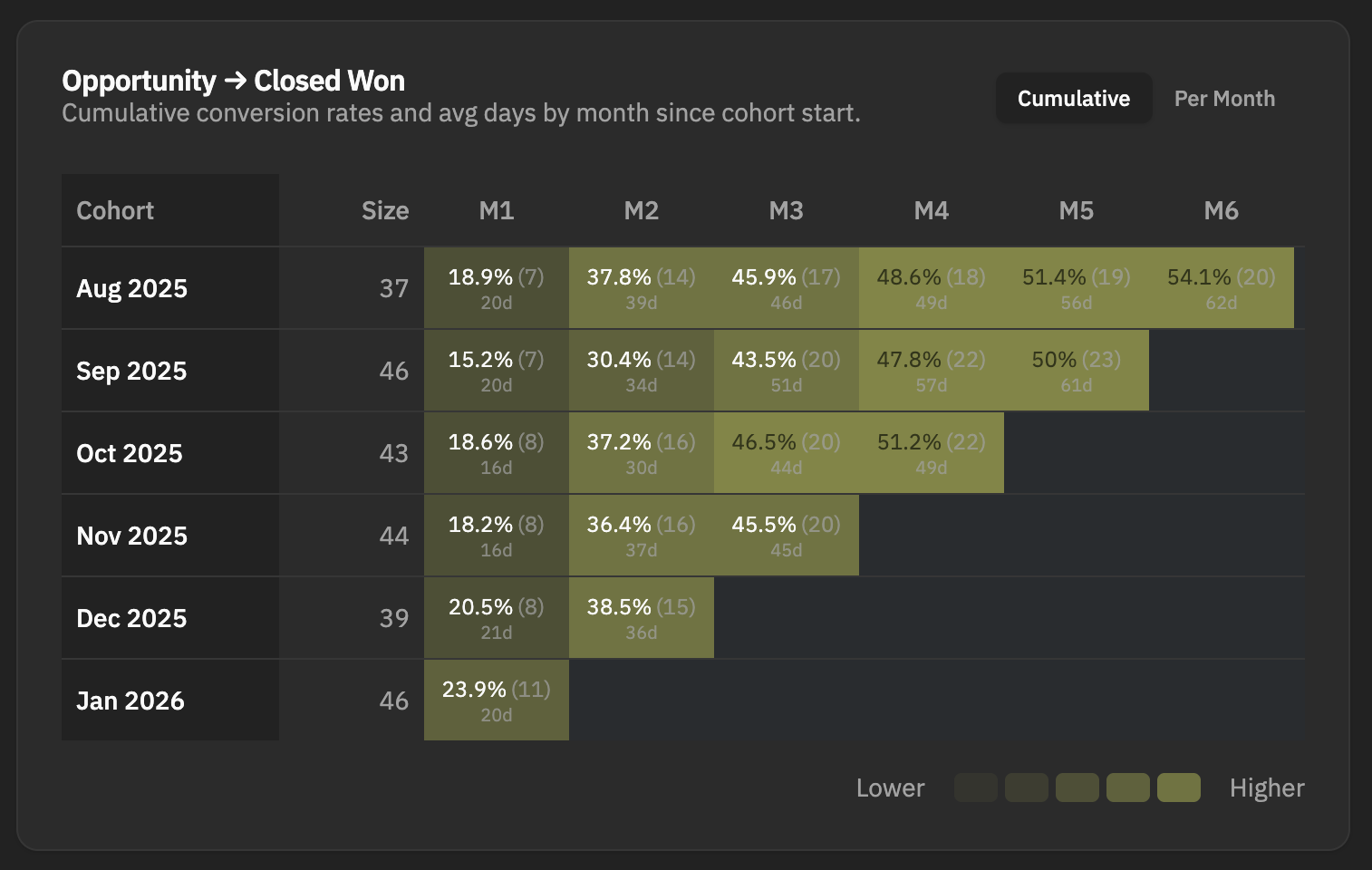
The goal is to give you answers in minutes—not hours of report-building.
Who It's For
LifecycleIQ is built for ops professionals who own funnel health and pipeline performance:
RevOps and Marketing Ops teams who need to connect lead performance to pipeline and revenue—and catch issues before they become problems.
Teams who report on the full funnel regularly—weekly standups, monthly reviews, board decks. Stop rebuilding the same reports every time.
Anyone tired of spreadsheet gymnastics just to answer the question: how is top-of-funnel affecting pipeline?
See Your Data in LifecycleIQ
Connect your HubSpot account and see your lifecycle and deal data for free. If you want to set goals or refresh your data automatically, you can upgrade from there.