Know If You're On Track—Across Every Stage

HubSpot reports show you what happened. LifecycleIQ shows you what's on track and what's not—across every lifecycle stage, in one unified view. Build your own funnel, set your goals, and always know where you stand.


Illustration of a master plan process | LifecycleIQ by Nth°Ops master dashboards

One Dashboard. Every Stage. Always Current.

  • See goal progress across all lifecycle stages at a glance
  • Build a custom Executive funnel with the stages that matter to you
  • Track deal pipeline alongside lifecycle progression
  • Compare performance to goal, pace, and prior periods
  • Filter to marketing-influenced contacts only
  • Connect once—data syncs automatically from HubSpot


Screenshot 2025-12-07 at 6.08.44 PM

How LifecycleIQ Works

  • Securely connects to your HubSpot account using HubSpot's official OAuth authentication.
  • Pulls your lifecycle stage and deal stage data—read-only access.
  • Displays real-time funnel metrics across three dashboards: Executive, Lifecycle, and Deals.
  • You set the goals. You control what you see. Your data never leaves your control.
Free

$0

See your funnel in action with limited history.

  • Executive, Lifecycle, and Deals dashboards
  • Current month data only
  • Basic goal tracking
Solo

$19

Full funnel visibility with historical comparisons.

  • 1 user w/full access
  • Any time frame
  • Real-time sync
  • Cancel anytime
Team

$49

Share funnel insights across your company.

  • Up to 5 users
  • Executive and view only users
  • Cancel anytime
  • $9/additional user

Get early access.

Be the first to try smarter tools for GTM audits and template building.

Frequently Asked Questions

How do I connect my HubSpot account?

Click "Connect HubSpot" and authorize LifecycleIQ through HubSpot's official OAuth flow. You'll grant read-only access to your contact and deal data. The connection takes about 30 seconds.


What HubSpot data does LifecycleIQ access?

LifecycleIQ reads:

  • Contact lifecycle stage values
  • Deal stage and pipeline data
  • Associated deal amounts

We do not access emails, notes, logged activities, or any other personal communication data.


Does LifecycleIQ modify my HubSpot data?

No. LifecycleIQ only reads your data. We do not create, edit, or delete any contacts, deals, or properties in your HubSpot account.


Where is my data stored?

Your HubSpot data is pulled in real-time when you view the dashboard. We cache minimal data (stage counts, not individual records) to improve performance. No contact-level data is stored on our servers.


Can I revoke access?

Yes. You can disconnect LifecycleIQ at any time from your HubSpot account under Settings > Integrations > Connected Apps. Once disconnected, LifecycleIQ will no longer have access to your data.


What's the difference between the three dashboards?

Executive Dashboard: A custom funnel you build by selecting which lifecycle and deal stages to include. Rename stages to match how your team talks about them.

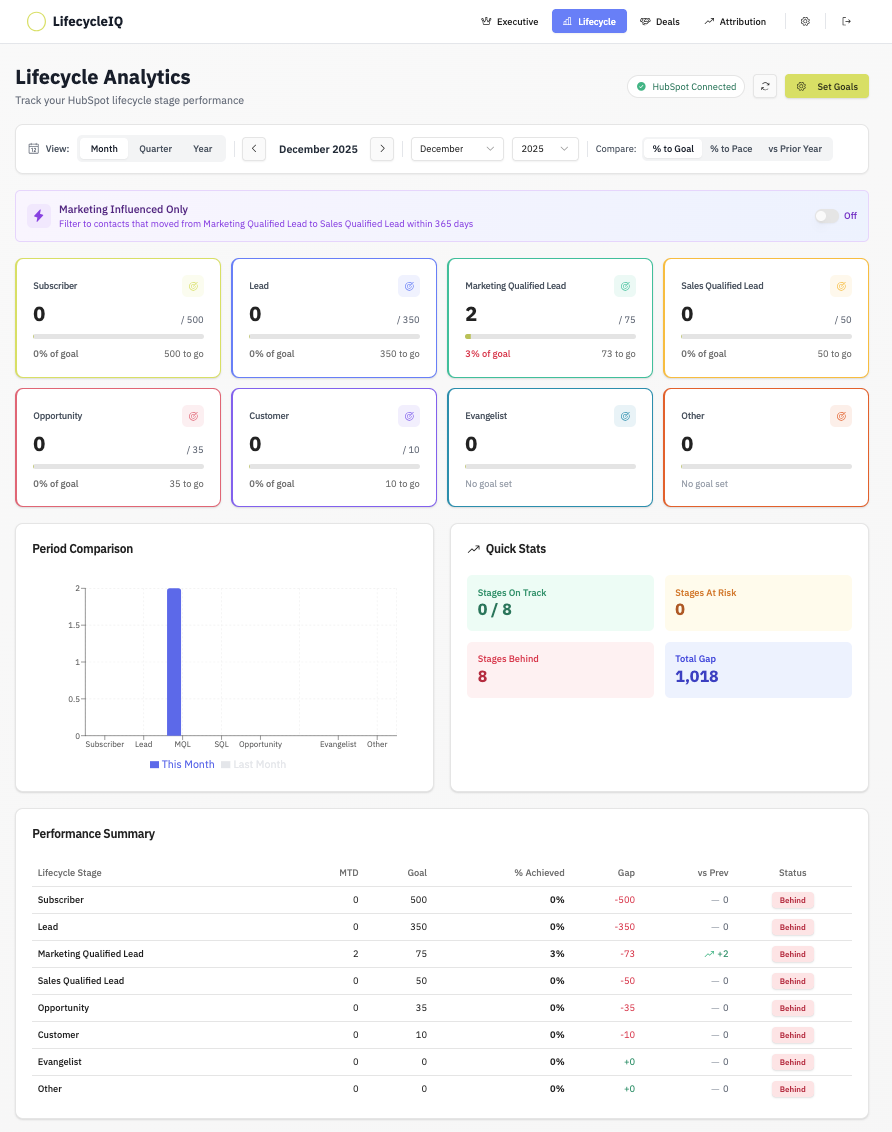
Lifecycle Dashboard: Shows all HubSpot lifecycle stages (Subscriber → Customer) with goal tracking for each. You control which stages are shown in the dashboard.

Deals Dashboard: Shows your deal pipeline stages with goal tracking and revenue metrics. You control which stages are shown in the dashboard.
 

What does "marketing-influenced" mean?

When enabled, this filter lets you customize a rule for which contacts to show. For example, only contacts who moved from Marketing Qualified Lead to Sales Qualified Lead within 365 days. It helps you use lifecycle goals for sales and marketing then see which pipeline activity marketing can take credit for.


How do I set goals?

Click "Set Goals" on the Lifecycle and Deals dashboards. Enter your monthly targets for each stage. LifecycleIQ will automatically calculate your progress, gap, and pace for the current period. CSV file upload is also supported.


Who can I contact for support?

For any questions, please email: support@nthops.com

We typically respond within 1 business day.